
Email filing, in every FileChimp Central plan
File email from any Outlook, into the folders you already use
FileChimp Central files email from new and classic Outlook, the web and your phone straight into your file server, SharePoint or OneDrive: by hand in two clicks, as you send, or automatically by rules.
Files to file servers on every plan; SharePoint and OneDrive from Central Plus. Nothing is stored with us.
Three ways to file
Filing that fits how people work
From the pane beside any email, as you send, or with no clicks at all.
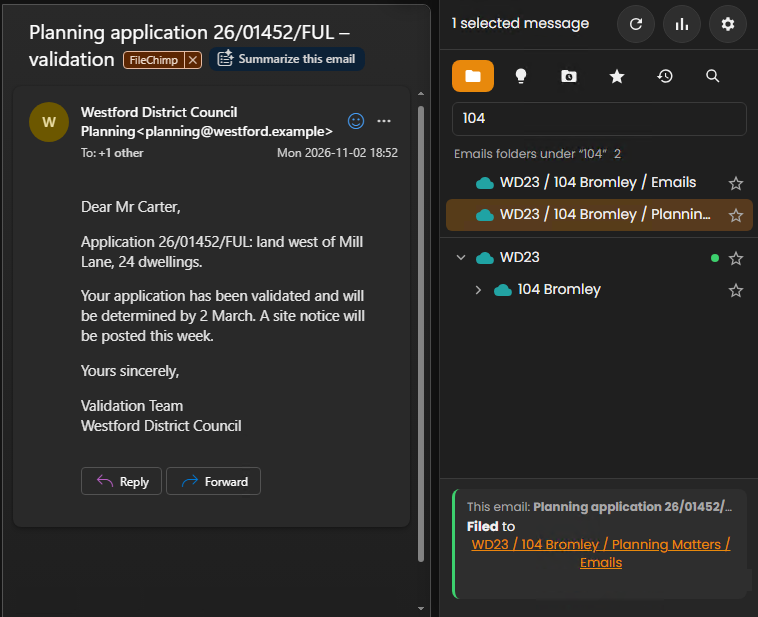
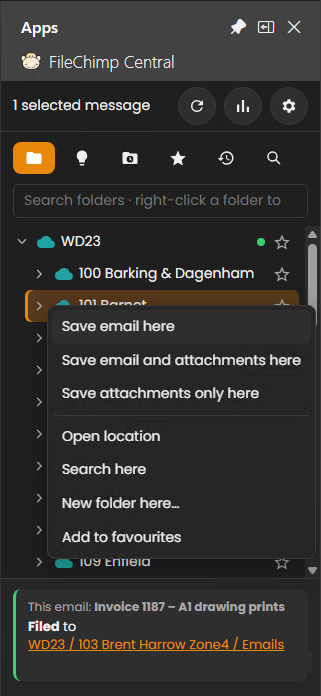
From the Outlook pane
Double-click a folder and the email is filed. Find any folder by name in seconds, follow suggested folders for each email, and file to several folders at once.
As you send
Choose the folder while you write and the sent email is filed once it has gone. Your company decides whether Send asks where to file, insists, or doesn’t ask.
Automatic filing rules
Rules file email by a project number, a [tag], keywords, an address, a category or an Outlook folder. A trial run shows what they would do first, and anything they can’t place waits on a To file list.
Where it goes
Your storage, your formats
File servers, SharePoint and OneDrive
Side by side in one list. Each person sees only the folders Windows lets them open, and several offices each see their own server. SharePoint and OneDrive come with Central Plus and Max.
Saved the way you want
As .eml, Outlook .msg or PDF, with PDF/A for long-term records. Your own file name templates, and attachments saved beside the email, in a sub-folder, or sorted by file name with Central Plus and Max.
Back in Outlook
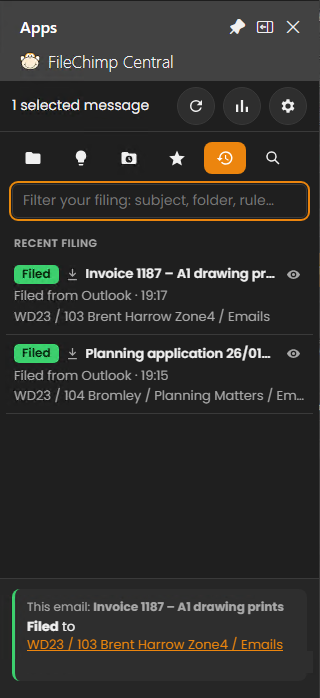
Filed emails get a category and show where they were filed, when and by whom, so colleagues don’t file them twice. Undo a filing if your company allows it.
Every Outlook
New Outlook, classic Outlook, web and phone
One add-in everywhere
New Outlook on Windows and Mac, Outlook on the web, iPhone, iPad and Android, and classic Outlook. It loads from your own server, so nothing is installed on each PC.
Classic Outlook too
The optional Outlook Helper asks where to file when you press Send in classic Outlook, and warns when a known name has a different address.
Shared mailboxes
File from any shared mailbox you can open. With Central Plus and Max, rules also read shared mailboxes such as accounts@ or info@ (one licence each).
Questions
Which plans include email filing?
Every FileChimp Central plan: filing from the pane, filing as you send and automatic rules. Central Plus and Max add SharePoint and OneDrive, search, attachment rules and rules for shared mailboxes. Compare the plans.
Where is our email stored?
In your own storage: your file server, SharePoint or OneDrive. FileChimp Central runs on your server, and our servers only handle licensing.
How do automatic filing rules work?
Rules file email without anyone clicking: by a project number in brackets in the subject, a keyword, an email address, the Outlook folder it was dragged to, or an Outlook category. FileChimp finds the matching folder by name, so new project folders are picked up without new rules.
Can we be prompted to file sent emails?
Yes, in new Outlook and Outlook on the web through the add-in, and in classic Outlook with the FileChimp Outlook Helper. Your administrator chooses whether Send asks or insists on a folder.
Do we install anything on each PC?
No. FileChimp Central is installed once, on your server, and the Outlook add-in is deployed to everyone from the Microsoft 365 admin centre. The Outlook Helper for classic Outlook is optional.
File your first email in minutes
Try FileChimp Central free for 2 weeks with your own folders.
